Streamline
StreamlineCore is a Minecraft plugin (and server-side mod) that extends server functionality through a module system. Modules are downloadable addons you place into the modules folder to add features to your server — from Discord integration to cross-network teleportation.
Server admins can mix and match modules to build the exact feature set they need, and developers can create their own modules using the Developer Framework.
Supported Server Types
Bukkit
Bukkit, Spigot, Paper, Folia, Purpur, ImmanitySpigot, and forks of the above that don't modify core code.
BungeeCord
BungeeCord, Waterfall, Travertine, Flamecord, XCord, and other BungeeCord/Waterfall forks that don't alter core code.
Velocity
Velocity and Velocity forks that don't modify core code.
Mod Loaders (Fabric, Forge, NeoForge)
StreamlineCore runs as a server-side mod on Fabric, Forge, and NeoForge. Each loader has its own jar per Minecraft version, named StreamlineCore-<Loader>-<version> (for example StreamlineCore-NeoForge-1211).
| Minecraft | Fabric | Forge | NeoForge | Java |
|---|---|---|---|---|
| 1.20.1 | ✓ | ✓ | ✓ | 17+ |
| 1.21.1 | ✓ | ✓ | ✓ | 21+ |
| 1.21.11 | ✓ | ✓ | ✓ | 21+ |
| 26.2 | ✓ | ✓ | ✓ | 25+ |
| 26.3 | ✓ | ✓ | ✓ | 25+ |
Requirements
| Platform | Required | Optional |
|---|---|---|
| Velocity | — | LuckPerms |
| BungeeCord | — | LuckPerms |
| Bukkit | BukkitOfUtils | LuckPerms, PlaceholderAPI |
| Fabric | Fabric API | LuckPerms |
| Forge / NeoForge | — | LuckPerms |
Running without LuckPerms
LuckPerms is a soft dependency. Without it, Streamline has no prefixes, suffixes, groups, or meta, and cannot change permissions itself; permission checks fall back to the platform's own rules (Bukkit/proxy permissions, or operator level on mod loaders). On Bukkit and the mod loaders, nodes that modules mark as "everyone may use" are granted to all players by default; an explicit LuckPerms setting still wins.
Installation
- Download and install the required dependencies listed above for your platform.
- Download StreamlineCore from SpigotMC or Modrinth.
- Place the jar into your server's
pluginsfolder (ormodsfolder on Fabric, Forge, and NeoForge). - Start your server, then stop it. This generates the default configuration files.
- Add any Modules you want to use.
- Configure the plugin to your liking.
- Start your server again.
Configuration
Streamline's files live in plugins/StreamlineCore/ (or mods/StreamlineCore/ on mod loaders):
| Path | Contents |
|---|---|
main-config.yml, main-messages.yml, server-config.yml | Core settings and messages |
commands/ | One file per command — label, aliases, permission, and messages are all editable |
modules/ | Module jars |
module-resources/ | Each module's own configuration folder |
Here's how the file structure is laid out:
Main folder: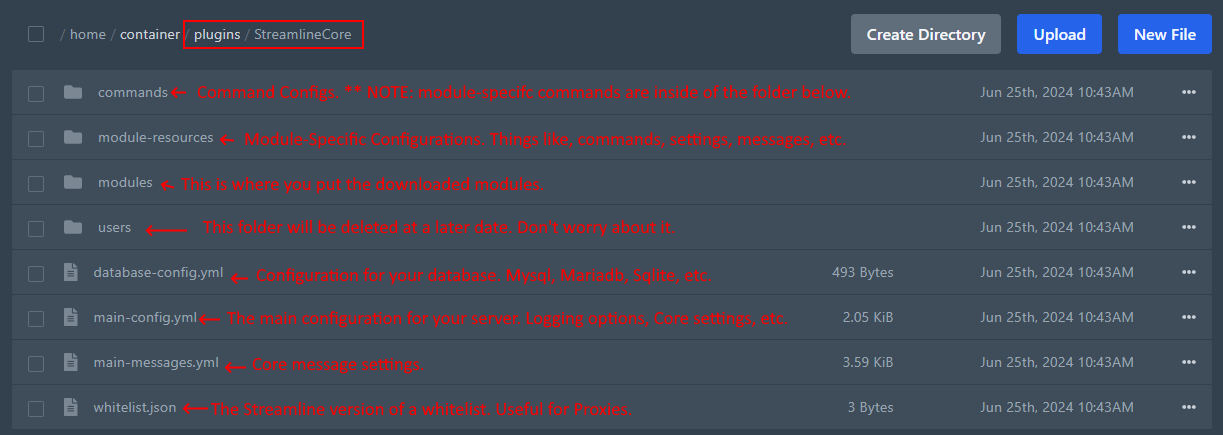
Commands folder: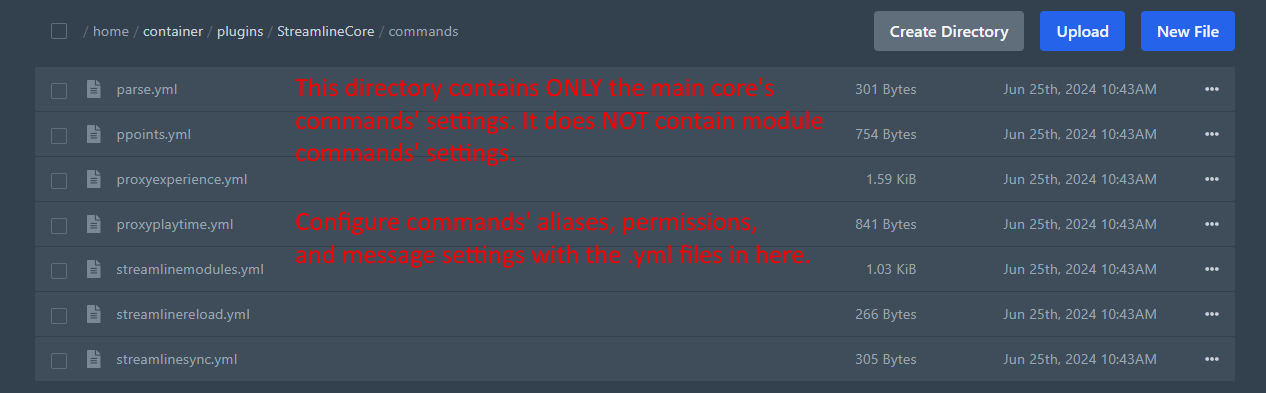
Core Commands
| Command | Aliases | Permission | Description |
|---|---|---|---|
/streamlinemodules | module, modules, pmodules, slm | streamline.command.streamlinemodules.default | List, load, unload, enable, disable, reload, or download modules |
/streamlinereload | slrl, slreload, slr | streamline.command.streamlinereload.default | Reload Streamline's configuration |
/parse | par, rat-parse | streamline.command.parse.default | Parse placeholders |
/proxyplaytime | pplaytime, pplay, proxyplay | streamline.command.playtime.default | View or edit a player's playtime |
/ptag | proxytag | streamline.command.tag.default | List, add, or remove a player's tags |
/setserveridentifier | setidentifier, setserver | streamline.command.setserveridentifier.default | Set the name this server uses in cross-server messaging |
/streamlinesync | slsync | streamline.command.streamlinesync.default | Force-save all loaded user data to the database |
/streamlinedebug | sldebug | streamline.command.streamlinedebug.default | Debug tools |
/modules sub-commands: list, load, unload, enable, disable, reload, reapply (each optionally followed by module names), and ecloud download <module> (version).
Namespaced commands on mod loaders
On Fabric, Forge, and NeoForge, every Streamline command (including module commands) is also registered as streamlinecore:<label> — for example /streamlinecore:modules. Use it when another mod registers the same command name.